
Learn how to easily deposit, pay, and transfer funds with Upward’s secure and efficient financial services. Access all the tools you need for smooth transactions and account management.
Account Number, Member Number, Routing Number
Your account and routing number are available to you 24/7 via Online & Mobile banking.
Routing Number
321171744
Account Number
Follow the steps below to retrieve your Account Number:
Log in to Online or Mobile banking
Click on the account you want
Click on Account Details
Your account number is listed as the ACH number
Note: your Savings and Checking Accounts all have different numbers
Member Number
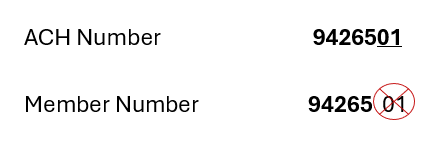
This is a global number that identifies your Membership with Upward.
If you remove the last two digits from your ACH number, you will end up with your Membership number. As shown here.
Current Members applying for a loan online will be asked to enter their Membership number, Tax ID and Date of Birth to get started.
Account Alerts and Notifications
At Upward Credit Union, we understand how important it is to manage your finances and stay informed about your account activity, which is why we offer Account Alerts and Notifications to keep you proactive and in control. Here’s how these alerts can help you:
Manage Finances: Never miss an important update or potential issue, such as a low balance or an unauthorized transaction.
Enhance Security: Be immediately notified of any suspicious activity, so you can take action right away to protect your account.
Save Time: Get reminders for bills, loan payments, and other important dates, so you never have to worry about missing deadlines.
What Are Account Alerts and Notifications?
Account Alerts are automatic notifications sent to you via email, text message, or push notifications through our Mobile Banking App. They provide quick updates on various activities related to your account, so you can quickly respond to any important changes.
Types of Alerts Available:
Balance Alerts: Receive notifications when your account balance falls below a certain threshold, helping you avoid overdraft fees or giving you a heads-up to manage your funds.
Transaction Alerts: Stay informed of any activity in your account, such as deposits, withdrawals, or transfers, ensuring you’re aware of every transaction.
Bill Payment Alerts: Get reminders for upcoming bill payments or confirmations when your payments are successfully processed.
Security Alerts: Protect your account with alerts for suspicious activities, such as login attempts from unrecognized devices or changes to your account information.
Loan and Credit Alerts: Get updates on your loan or credit accounts, including upcoming payments, due dates, and changes to your account status.
How to Set Up Account Alerts:
Setting up alerts is easy! Simply log in to your mobile banking app or online banking portal, navigate to the alerts section, and choose the alerts that are right for you. You can customize your preferences based on the types of notifications you want and how you’d like to receive them.
ATMs & Shared Branching
Whether you’re near an Upward Credit Union location or miles away, enjoy convenient access to your accounts wherever life takes you. Through the CO-OP Network, Upward members have access to more than 30,000 surcharge-free ATMs and 5,600 Shared Branch locations nationwide.
Surcharge-Free ATMs
Access your money without paying a surcharge at participating CO-OP ATMs nationwide. Withdraw cash, check balances, make transfers, and even deposit checks at select ATMs.
CO-OP ATMs can be found at participating credit unions and popular retailers such as 7-Eleven, Costco, Target, and more. Just look for the CO-OP symbol.
Shared Branching
Need in-person service while away from Upward? Visit a participating Shared Branch to make deposits and withdrawals, transfer funds, make loan or credit card payments, check balances, and more.
Click here for more information.
Bill Pay
Bill Pay is a convenient and secure way to take control of when and how your bills are paid. With our enhanced Bill Pay service, managing your finances has never been easier—or faster. Plus, you’ll save money by skipping the need for checks. Here’s what you’ll enjoy:
User-Friendly Design: An intuitive platform that makes paying bills simple.
Flexible Scheduling: Set up one-time or recurring payments to fit your needs.
Versatile Payment Options: Pay bills or send a check to an individual—whether it’s to settle up or send a thoughtful gift (Happy Birthday!).
Digital Wallets
A digital wallet securely stores your payment cards on your mobile device, allowing you to make purchases quickly without needing your physical cards. Add your Upward Credit Union Debit or Credit Card to Apple Pay, Google Pay, or Samsung Pay, and enjoy secure, convenient payments right from your device. With a digital wallet, you’ll have instant access to your cards, ensuring safer, faster transactions wherever you go.
Direct Deposit
Direct Deposit is a convenient and secure way to have your paycheck, government benefits, or other payments automatically deposited into your Upward Credit Union Account. Instead of waiting for a paper check, your funds are deposited electronically, often on the same day, ensuring quick access to your money. This service eliminates the need for trips to the credit union and reduces the risk of lost or stolen checks.
“Early” Direct Deposit
Get Paid Faster: Payroll received via direct deposit is typically available up to two days before your scheduled payday.
No Added Cost: Early direct deposit is completely free and automatically enabled on your account.
Please Note: Early availability is not guaranteed, as it is dependent on when your employer or payroll provider submits the payment file.
Get Started
Provide your account number and our routing number: 321171744 to your payroll provider.
Our address, if needed, is: Upward Credit Union, 1860 El Camino Real, Suite 100, Burlingame, CA 94010
It may take 1–2 pay periods for direct deposit to begin. Please check with your payroll provider for specific timelines.
Funds Availability
Funds received by direct deposit are generally available upon receipt into the account.
Mobile Deposit
Mobile Deposit is a convenient way to deposit checks into your account from anywhere, at any time! Simply snap a picture of the front and back of your check using our Mobile App, and your deposit is done. It's quick, secure, and hassle-free — no need to visit a branch. To get started, log in to Mobile Banking and enroll today! Experience banking on your terms!
Mobile Deposit History - You can review your mobile deposit history by clicking the folder icon in the upper right corner of the check deposit screen.
Check Destruction - It is recommended to keep the original check for at least 90 days from the date of the deposit. After this period, if the check has been cleared, you may securely dispose of the check. This is to allow for any potential issues or corrections that may arise, and the original check is needed
Funds Availability - Funds from mobile deposit are generally available by 6:00pm after the 2nd business day.
Payroll Deduction
Payroll Deduction allows you to automatically have a portion of your paycheck deducted and deposited into your Upward Credit Union Account. This can be used for savings, loan payments, or to contribute to specific accounts like a Holiday Savings. Payroll deduction helps you stay on track with your financial goals by making saving and paying bills seamless and automatic.
External Transfers & Pay a Person
Owe a friend money for dinner? Need to move money between your accounts? Try our Money Movement System via online/mobile banking. It’s secure and convenient way to move everyday amounts between your accounts. Larger transfers may require a wire.
External Transfer (A2A) lets you move money to/from Upward and accounts you hold at other financial institutions.
Pay a Person (P2P) lets you send money send money directly to another person using their cell phone number or email address.
Recipients generally receive funds the next business day, if processed before 2:00 PM PST.
As an added bonus, all of our accounts and cards are compatible with other services such as Venmo, PayPal, Apple Cash, Cash App, and more!
Internal Transfers
An Internal Transfer is an easy way to move funds between Upward Credit Union Accounts. Whether you’re transferring money from your Checking Account to Savings, making a payment to your loan, or trying to pay a friend back for lunch. An internal transfer makes it easy, and all you need are the Upward Account numbers.
Wire Transfers
A Wire Transfer is a secure and efficient way to send money directly from your Upward Credit Union Account to another financial institution, either locally or internationally. This service allows for fast transfers of large amounts, making it ideal for urgent payments, such as purchasing a home. Wire transfers are processed quickly using available funds in your account, ensuring your money reaches its destination securely.
Important Information:
Wire requests must be received on a business day by 12:00 PM PST for same-day processing.
Additional details may be required in order to process the wire transfer.
Fees may apply to send, receive, or research wire transfers; please refer to the Upward Credit Union Schedule of Fees for current pricing.
Additional fees may also be assessed by other institutions handling the transfer.
Wire Fraud Warning
NEVER transfer funds based solely on electronic communications (such as email). Scammers easily disguise messages to look like they are from your bank, credit union, real estate agent, or title company.
VERIFY all wiring instructions by phone before sending any money. Use a previously known, trusted phone number, never use the contact info listed in a suspicious message. When possible, attach a copy of these written instructions to your request form.
REPORT any suspicious activity immediately to the Credit Union, the FBI, and local law enforcement.
BEWARE that both buyers and sellers are targeted by hackers using convincing fake emails.
Receive A Wire
Use the following three pieces of information to receive a wire transfer of funds into your Upward Credit Union Account.
1) Receiving Depository Institution:
Catalyst Corporate FCU, 6801 Parkwood Boulevard, Plano, TX 75024
Routing Number: 311990511
Note for International Wires: We do NOT have a SWIFT code. The sending foreign bank will need to go through its US correspondent bank or a foreign correspondent bank that has a banking relationship with a US correspondent bank
2) Further Credit to:
Upward Credit Union
Upward Account Number: 321171744
3) For the Benefit of:
Member Name
Member Account Number
Send A Wire
To initiate an outgoing wire transfer, please complete a current Wire Transfer Request form, sign it (wet signature required), and return it to us on a business day by 12:00 PM PST for same-day processing. Forms received after the cutoff will be processed the next business day. You can obtain the form at any Upward Credit Union branch or by emailing info@upwardcu.org.
Information you will need to complete the wire form:
1) Receiving Financial Institution:
Name & Address
Domestic Wires = Routing Number
International Wires = SWIFT Code
2) Beneficiary Information:
Name & Address
Account Number, IBAN, or Sort Code
3) Additional Information/Intermediary Bank Information
Provide this information as applicable.
4) Purpose of the Wire
This cannot be left blank and must be detailed enough to provide understanding about the use of funds being transferred.
When processing funds for real estate it is recommended to include escrow numbers.
5) Supporting Documentation
Please provide a copy of the written wiring instructions, invoice, or escrow disclosure you received to help our team verify accuracy and prevent fraud.